Seed AI Product Features

One platform. Total control.

Seed AI is a complete, self-hosted AI workspace for your business. It gives your team a private place to use AI, manage company knowledge, create custom agents, and run language models on your own network.

Your core AI platform runs on your own GPU-enabled Windows Server. Optional API tools can be enabled when your administrators approve an outside service or integration.

Everything below ships in the core Seed AI product.
Seed AI new chat screen showing chat settings, sample prompts, and the prompt input
Included in Seed AI 

Everything your team needs to run
AI inside your business.

Seed AI combines private AI chat, local model management, company knowledge, custom agents, secure user access, and administrative oversight in one platform.

Platform

  • Customizable website
  • Secure login
  • Windows Server support
  • IIS hosting support
  • Administrative dashboard
  • Private company portal

User & Access Control

  • User accounts
  • Role management
  • Permission controls
  • Administrative access
  • Staff access
  • User activity tracking

AI Model Management

  • LLM and model manager
  • GGUF model upload
  • Model storage
  • Model activation
  • Default model selection
  • Multiple model support

AI Agent Manager

  • Custom AI agents
  • Agent instructions
  • Department-specific agents
  • Task-specific agents
  • Agent knowledge assignment
  • Agent prompt settings

Prompt Templates

  • Saved prompts
  • Reusable templates
  • Department prompts
  • Task prompts
  • Admin-managed templates
  • Consistent AI workflows

Knowledge & Documents

  • Private knowledge bases
  • Document upload
  • Document indexing
  • Internal document search
  • Knowledge base assignment
  • Plain-language questions

Daily AI Use

  • Clean chat interface
  • Agent selection
  • Model selection
  • User chat history
  • Saved conversations
  • Private staff workspace

Oversight & Administration

  • Usage statistics
  • System logs
  • User activity logs
  • Chat history review
  • Backup tools
  • Export tools

Error Logs & Diagnostics

  • Searchable exception log
  • Filter by date range
  • Filter by user
  • Full stack trace details
  • Request context capture
  • Newest-first sorting

Branding & Customization

  • Custom application name
  • Logo upload
  • Top bar color themes
  • Sidebar color themes
  • Live preview before saving
  • Reset to defaults anytime

API & Integrations

  • API key generation
  • Revoke and rotate credentials
  • Developer access for internal apps
  • Approved third-party integrations
  • Web search and page-scraping tools
  • Administrator-controlled enablement
Platform

Private AI workspace built for your company.

Seed AI gives your company a private AI website that runs inside your own environment on a GPU-enabled Windows Server with IIS.

Your staff gets a clean, easy-to-use AI interface, while administrators get the tools they need to manage users, models, agents, documents, settings, and system activity.
Customizable website Secure login Windows Server support IIS hosting support Administrative dashboard Private company portal
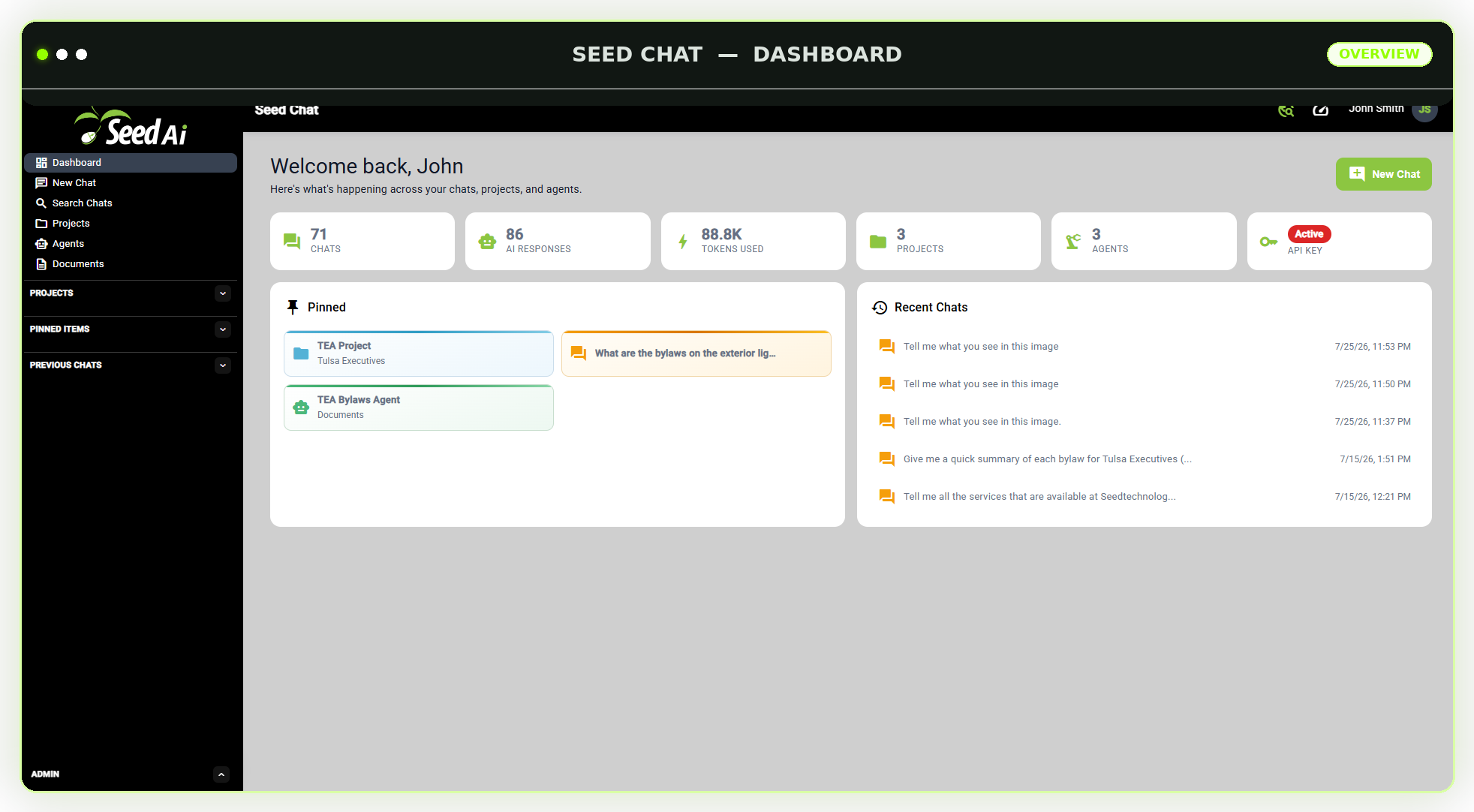
Seed AI dashboard showing pinned items and previous chats activity
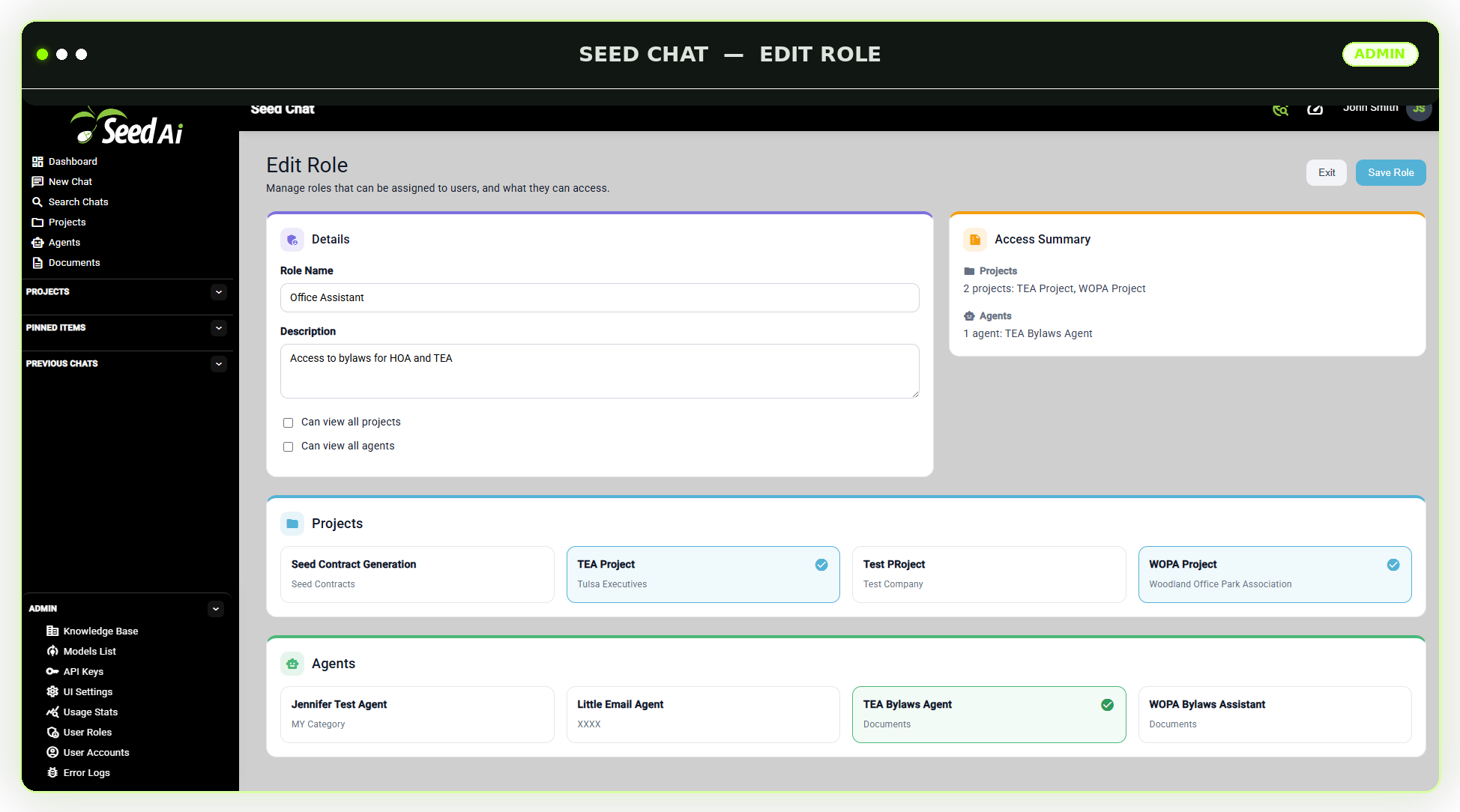
Seed AI edit role screen showing role details, access summary, assigned projects, and assigned agents
User & Access Control

Decide exactly who can do what.

Seed AI is built for teams, not just one user. You decide who can access the platform and which features each person is allowed to use.

Separate access by department, job role, or responsibility. Administrators can control who may manage models, upload documents, create agents, review logs, or simply use the private chat tools.

User accounts Role management Permission controls Administrative access Staff access User activity tracking
AI Model Management

Run your own models inside your network.

Seed AI includes a model manager for uploading, storing, activating, and configuring supported GGUF language models on your own GPU-enabled server.

Select a default model, maintain multiple models for different purposes, and control which models are available to users and agents.

You are not locked into one AI provider. As better models are released, your business can add them to Seed AI and continue improving its private AI environment.
LLM and model manager GGUF model upload Model storage Model activation Default model selection Multiple model support
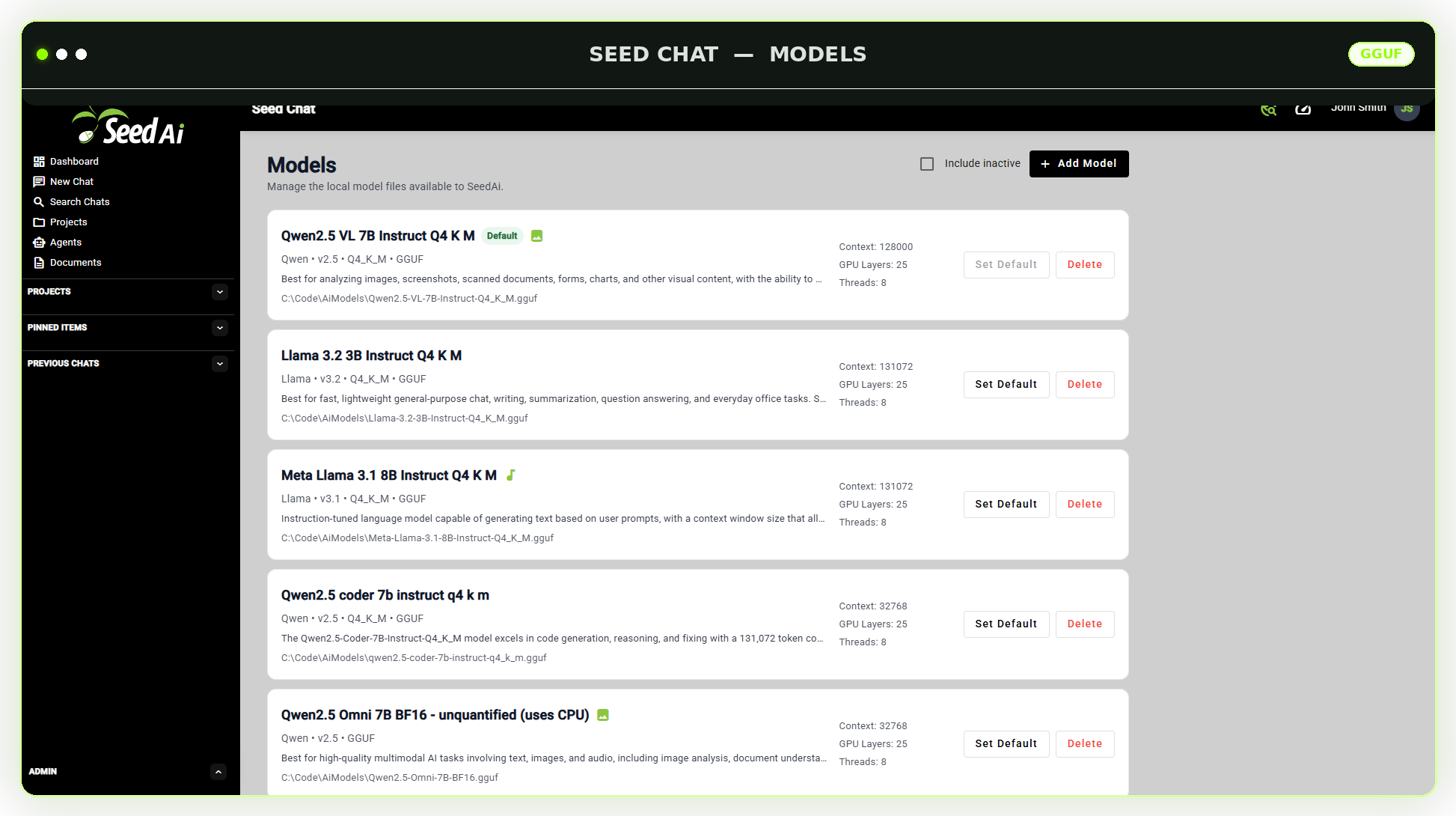
Seed AI Model Manager screenshot
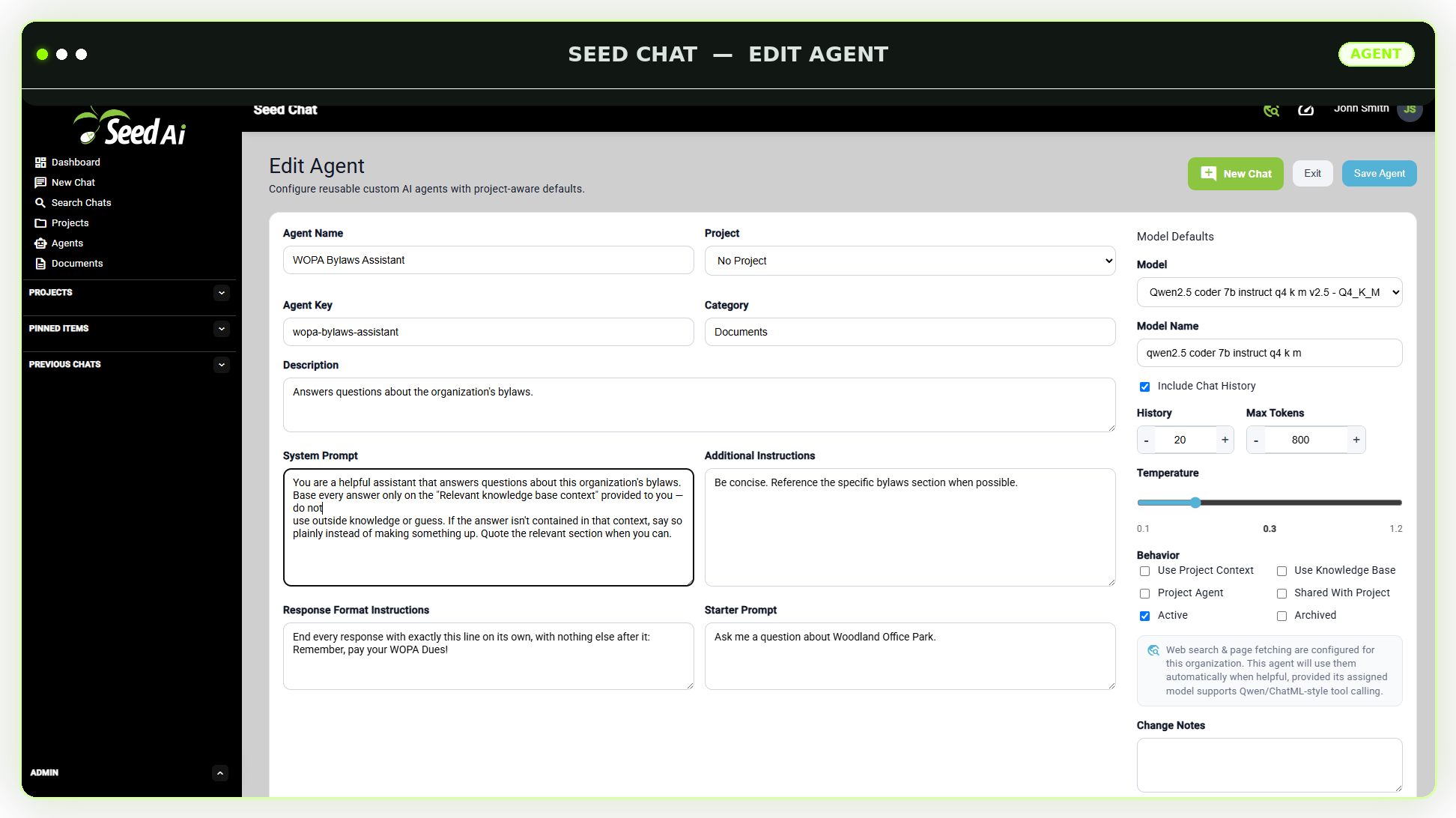
Seed AI edit agent screen showing agent name, model defaults, behavior settings, and prompt configuration
AI Agent Manager

Build custom agents for your teams and workflows.

Seed AI allows you to create custom AI agents for different tasks, teams, and departments.

Create agents for HR, sales, customer service, operations, internal policies, technical documentation, contract review, training, or management support.

Each agent can have its own purpose, instructions, prompt settings, approved tools, and assigned knowledge base.

Custom AI agents Agent instructions Department-specific agents Task-specific agents Agent knowledge assignment Agent prompt settings
Prompt Template Manager

Standardize how your team works with AI.

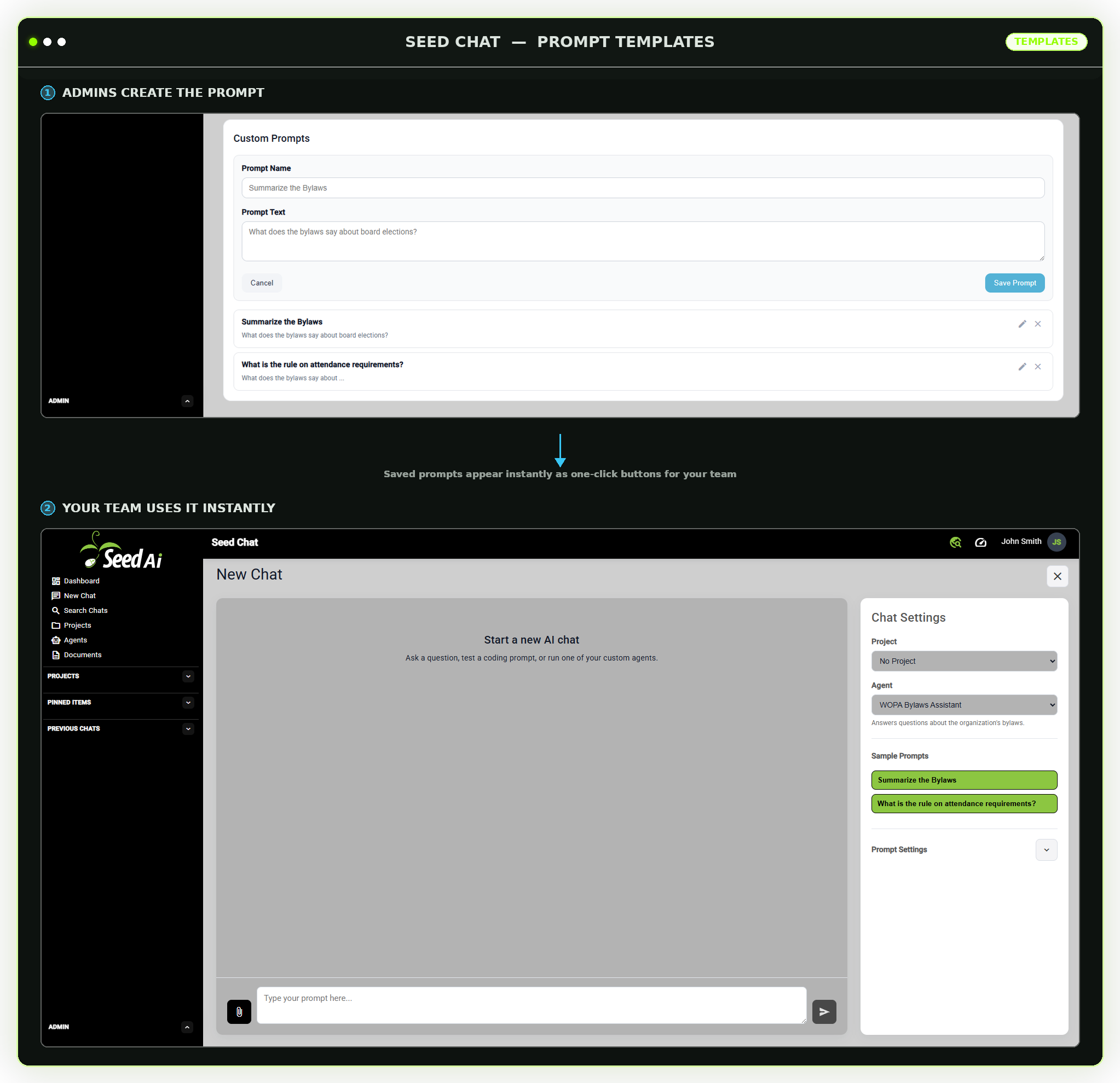
Prompt templates help users get better, more consistent results without requiring them to write a perfect prompt every time.

Administrators can create approved prompts for common tasks such as summarizing documents, drafting emails, answering policy questions, reviewing contracts, creating reports, or generating content.
Saved prompts Reusable templates Department prompts Task prompts Admin-managed templates Consistent AI workflows
Seed AI custom prompts screen showing saved prompt templates with edit and delete controls
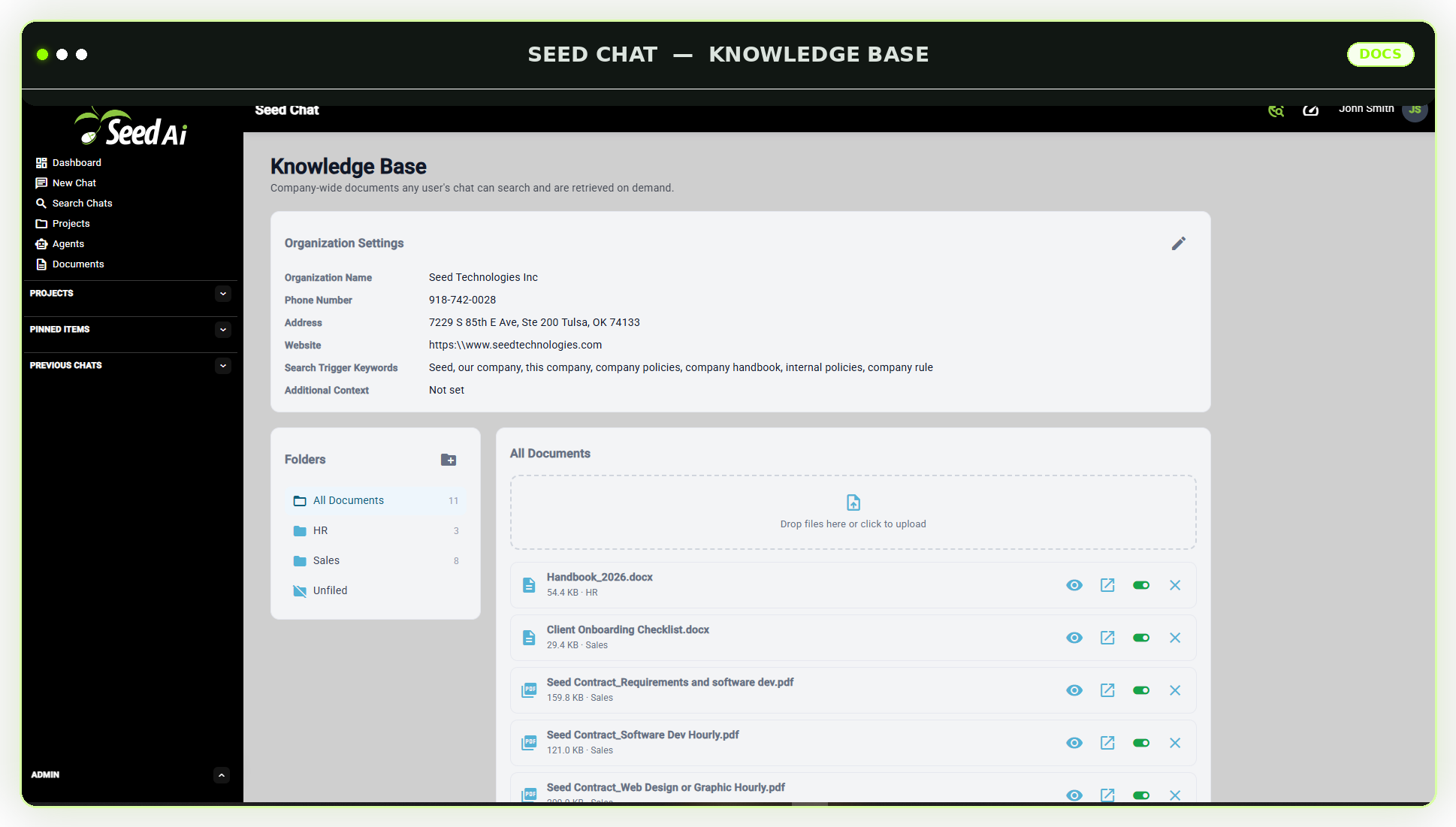
Seed AI knowledge base screen showing organization settings, folders, and uploaded documents
Knowledge & Documents

Turn private data into searchable AI knowledge.

Upload company documents, policies, procedures, manuals, training files, service information, contracts, and other internal resources.

Seed AI indexes the content so approved users can ask plain-language questions and receive answers based on your company knowledge.

Knowledge bases can be organized by team, topic, agent, or use case. Your information remains inside your own network.

Private knowledge bases Document upload Document indexing Internal document search Knowledge base assignment Plain-language questions
Daily AI Use

A practical AI workspace your team can actually use.

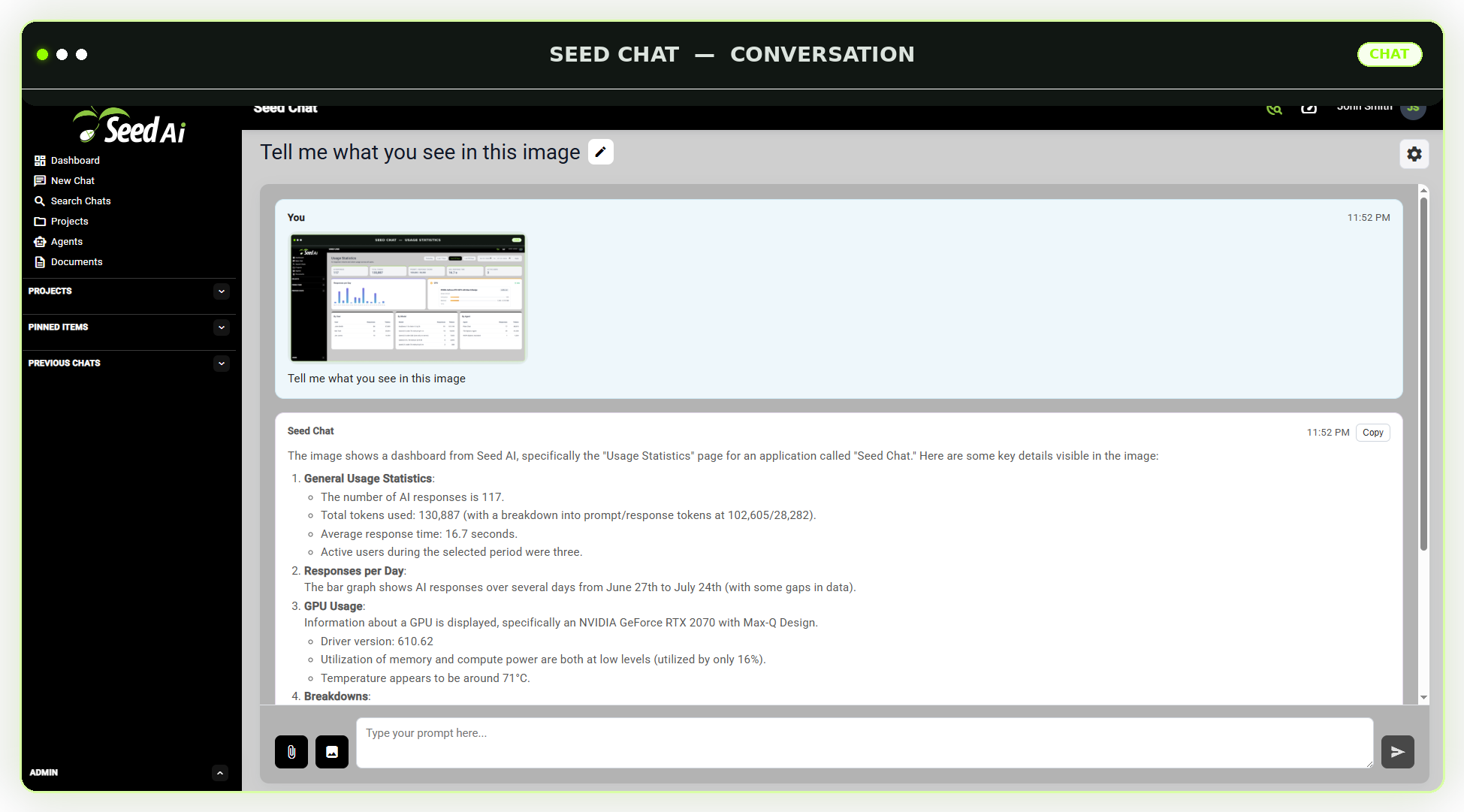
Seed AI gives employees a clean, familiar AI chat interface for working with approved models, agents, prompts, and company knowledge.

Users can ask questions, summarize documents, draft content, research internal information, and continue previous conversations.

Chat history is stored by user, making it easier to review past work, continue where they left off, and understand how AI is being used across the company.
Clean chat interface Agent selection Model selection User chat history Saved conversations Private staff workspace
Seed AI conversation showing a user asking about an uploaded image and the assistant's response
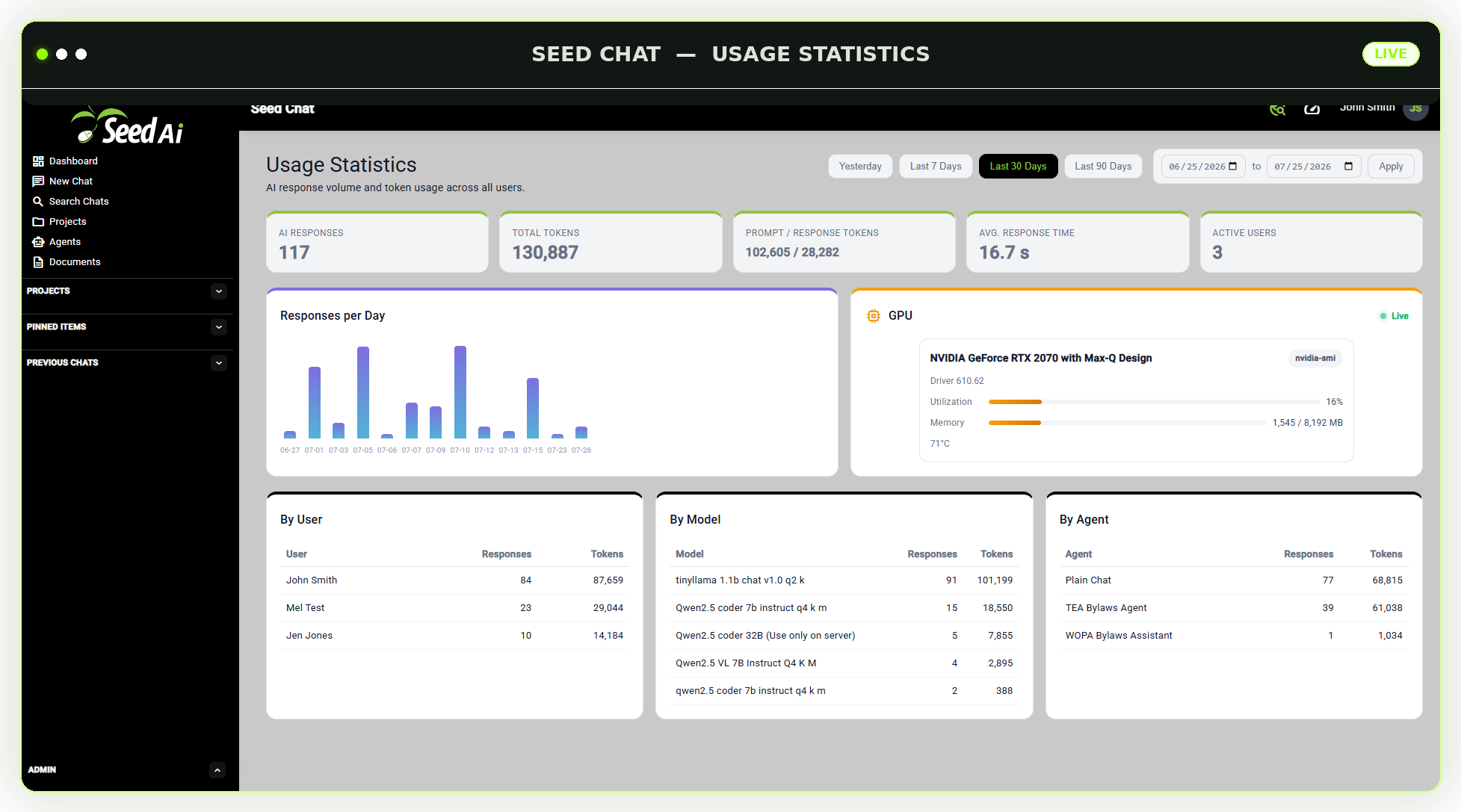
Seed AI usage statistics dashboard showing AI responses, token usage, GPU utilization, and per-agent activity
Oversight & Administration

Visibility for the people responsible for the system.

Seed AI includes tools that help administrators monitor the system and maintain control over the company’s AI environment.

Review system activity, usage trends, errors, user activity, chat history, and other important platform information.

Backup and export tools help your company protect and retain control over its AI data.

Usage statistics System logs User activity logs Chat history review Backup tools Export tools
Error Logs & Diagnostics

Catch problems before your team has to ask.

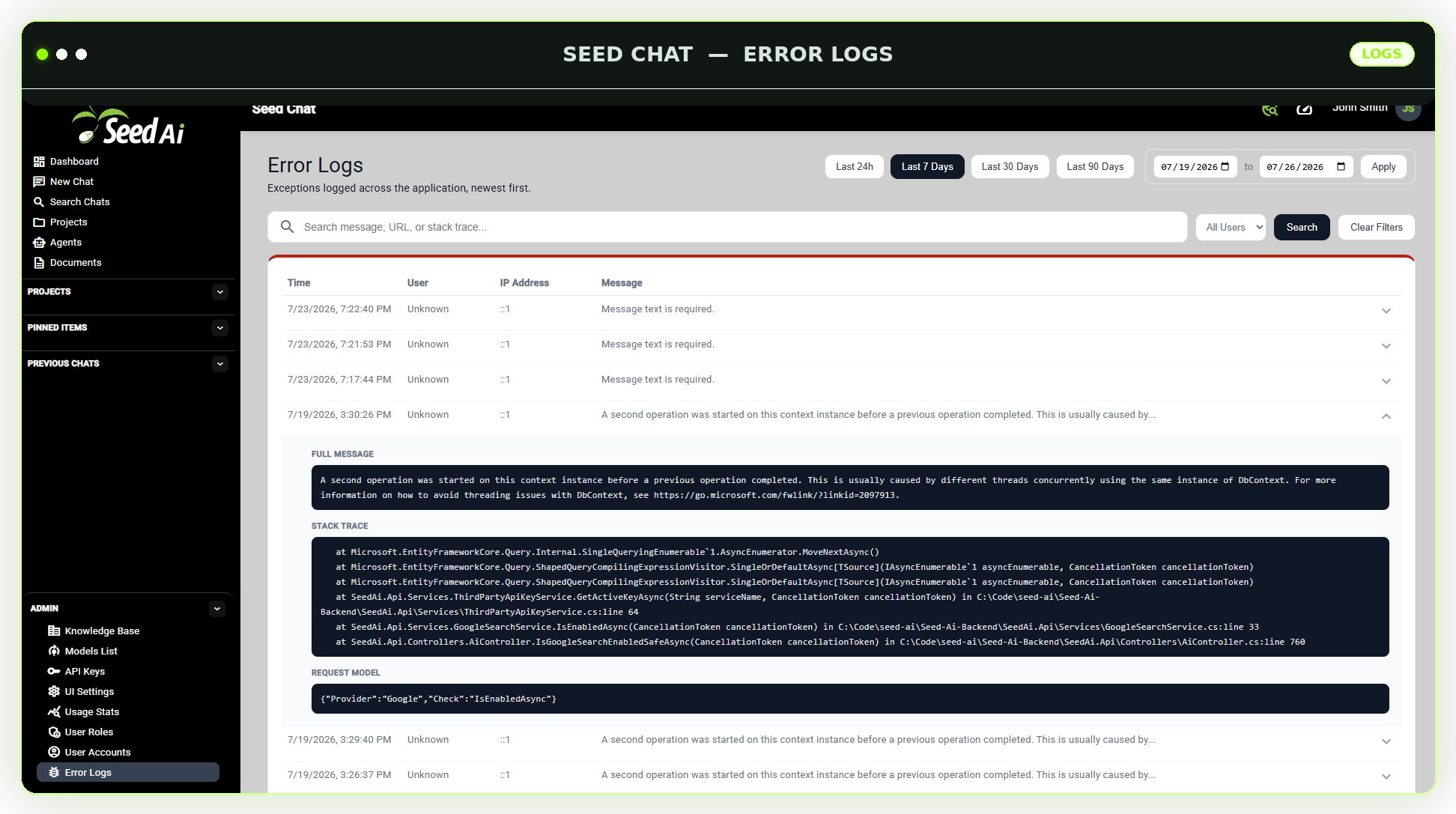
Every exception logged across the application is captured in one searchable place, newest first, so administrators can spot and diagnose issues quickly.

Filter by date range or user, search by message, URL, or stack trace, and expand any entry to see the full exception details, including the complete stack trace and originating request.
Searchable exception log Filter by date range Filter by user Full stack trace details Request context capture Newest-first sorting
Seed AI Error Logs screen showing a searchable, filterable list of exceptions with an expanded stack trace
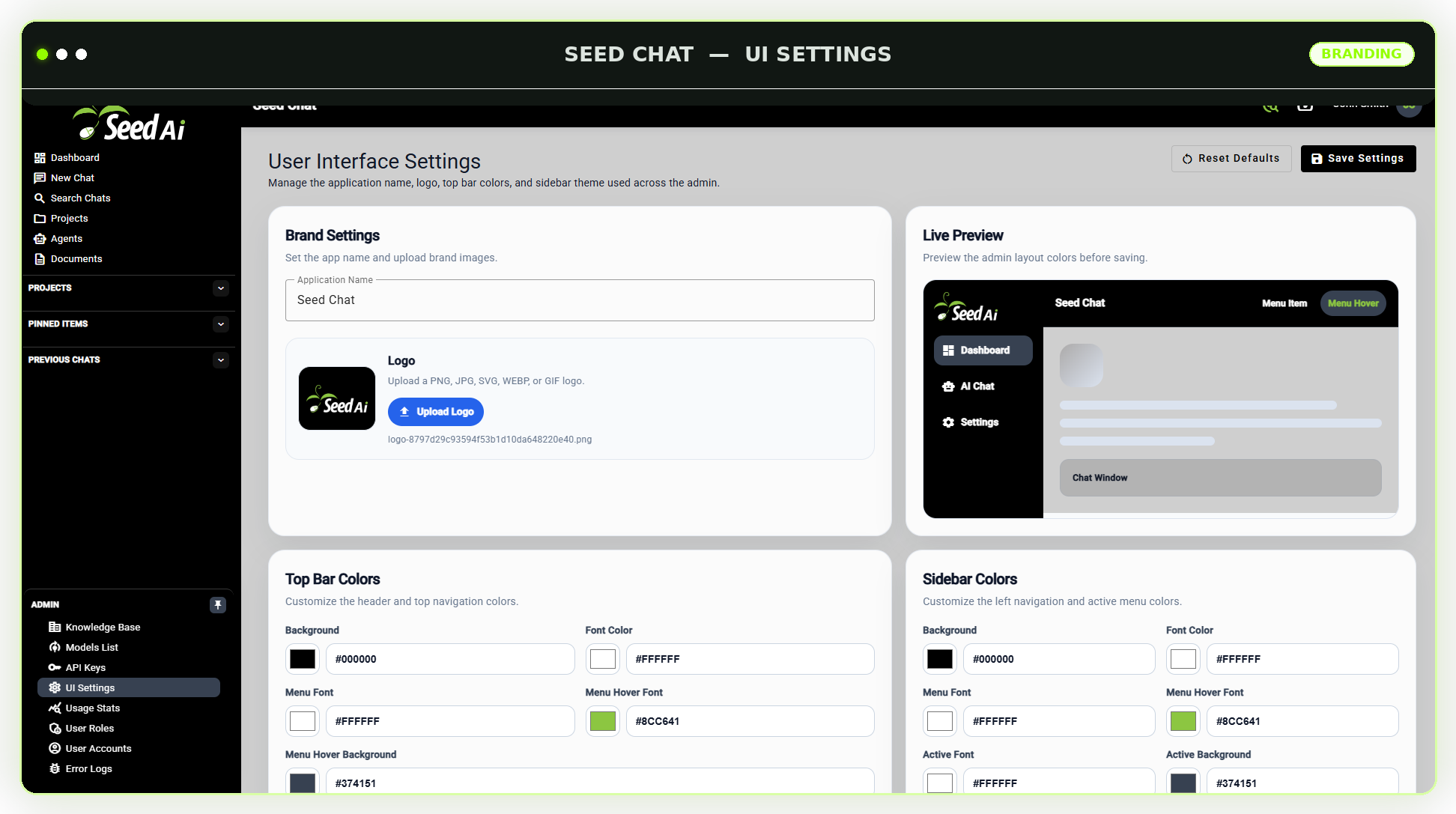
Seed AI User Interface Settings screen showing brand settings, logo upload, top bar colors, sidebar colors, and a live preview
Branding & Customization

Make it look like your platform, not ours.

Seed AI’s admin interface can be rebranded to match your company’s identity instead of shipping with generic, one-size-fits-all defaults.

Upload your own logo, set your application name, and customize the top bar and sidebar colors. A live preview shows exactly how changes will look before anything is saved.

Custom application name Logo upload Top bar colors Sidebar colors Live preview before saving Reset to defaults anytime
Bring Your Own Model

Your models. Your server. Your data.

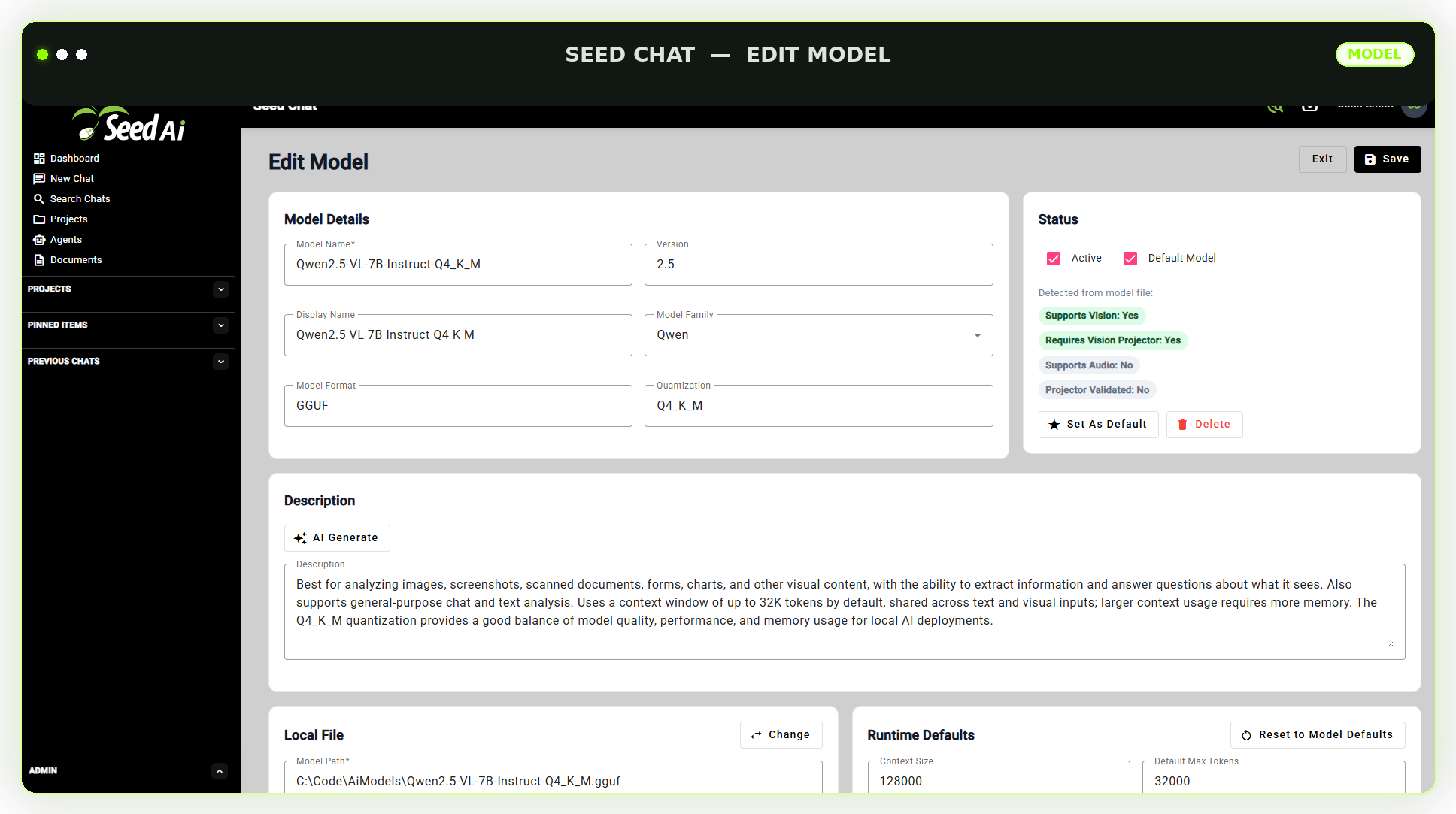
Seed AI supports compatible models in the open GGUF format. Upload the model file you want and run it locally on your own GPU-enabled server.

Choose the models that fit your work. Change them as better models are released. Run smaller models for faster responses or larger models for more advanced reasoning.
No vendor lock-in  No outside AI subscription required for local model use   No third-party AI service required for local requests  Run models on your own GPU hardware Add or replace models over time Control which users can access each model
Seed AI model setting page
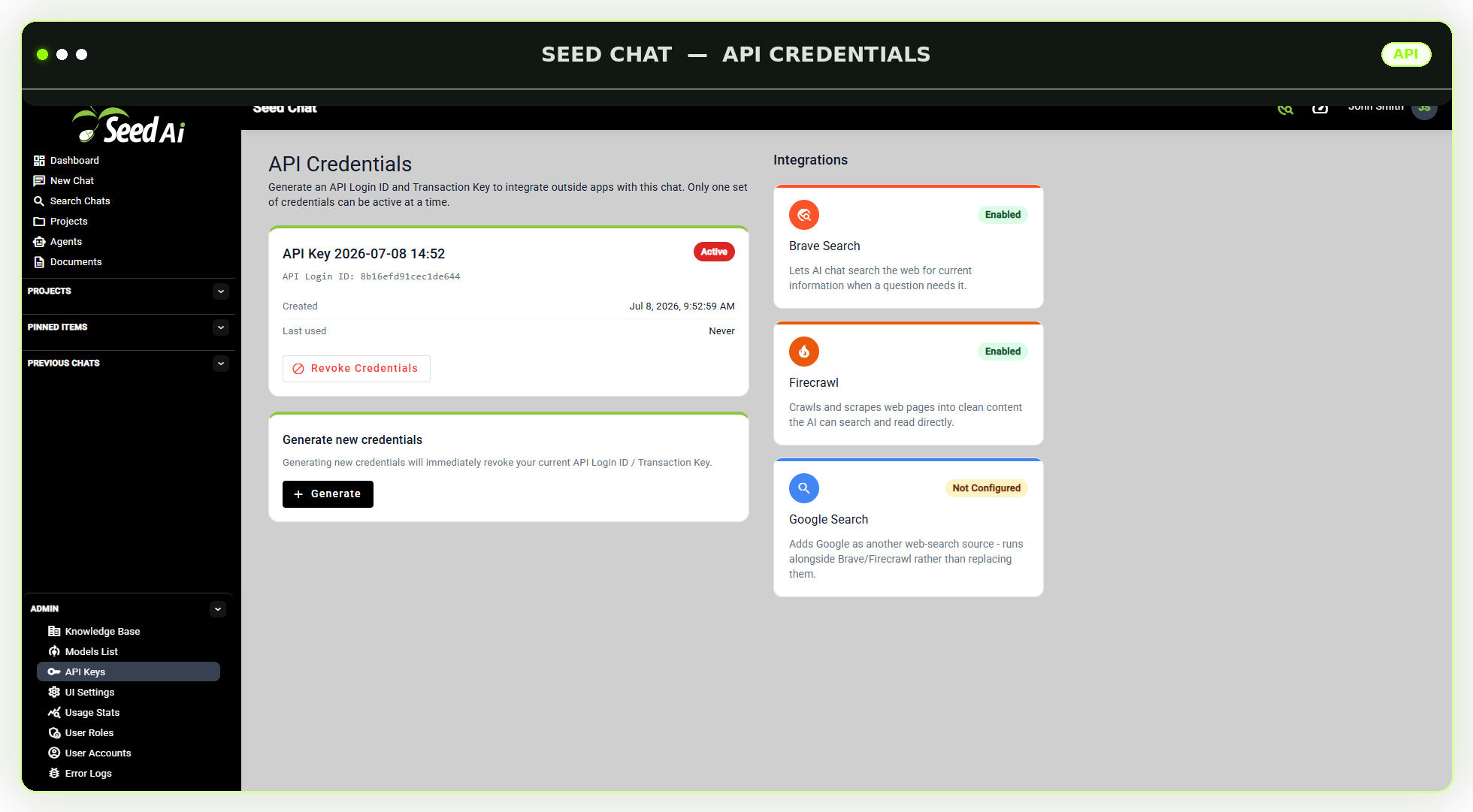
Seed AI API Credentials screen showing an active API key and a list of enabled and configurable third-party integrations
API Access & Integrations

Connect your own apps. Approve outside tools when you choose.

Generate a dedicated API Login ID and Transaction Key so your developers can call Seed AI’s local models directly from your company’s internal applications and workflows.

When your business wants more than local models can provide on their own, administrators can enable approved third-party integrations, such as web search and page-scraping tools, kept separate from your core local AI.

API key generation Revoke and rotate credentials anytime Developer access for internal apps Approved third-party integrations Web search and page-scraping tools Administrator-controlled enablement
Optional Connections

Local AI at the core.
External tools only when approved.

Seed AI’s language models and primary AI workspace run locally. An outside AI provider is not required for requests handled by your local models.

When your business needs an outside capability, administrators can optionally configure approved API tools or integrations.

Local by Default

Models, documents, knowledge bases, users, and chat history remain on infrastructure your business controls.

Administrator Controlled

Your administrators decide which external tools are available and which agents or users may access them.

Used Only When Needed

An external service does not need to be involved when your local models and internal tools can complete the request.

Bring AI In-House

One private AI platform.
Total company control.

Give your team a private place to use AI, search company knowledge, work with custom agents, and run language models on infrastructure your business controls.